Note
Access to this page requires authorization. You can try signing in or changing directories.
Access to this page requires authorization. You can try changing directories.
In Azure, a resource is a manageable item that you create and configure within your Azure subscriptions and resource groups. Resource providers are management services that deliver specific types of resources. While you might work with many resources to deploy a workload in Azure, Azure Files centers on two key resources:
Storage accounts, offered by the
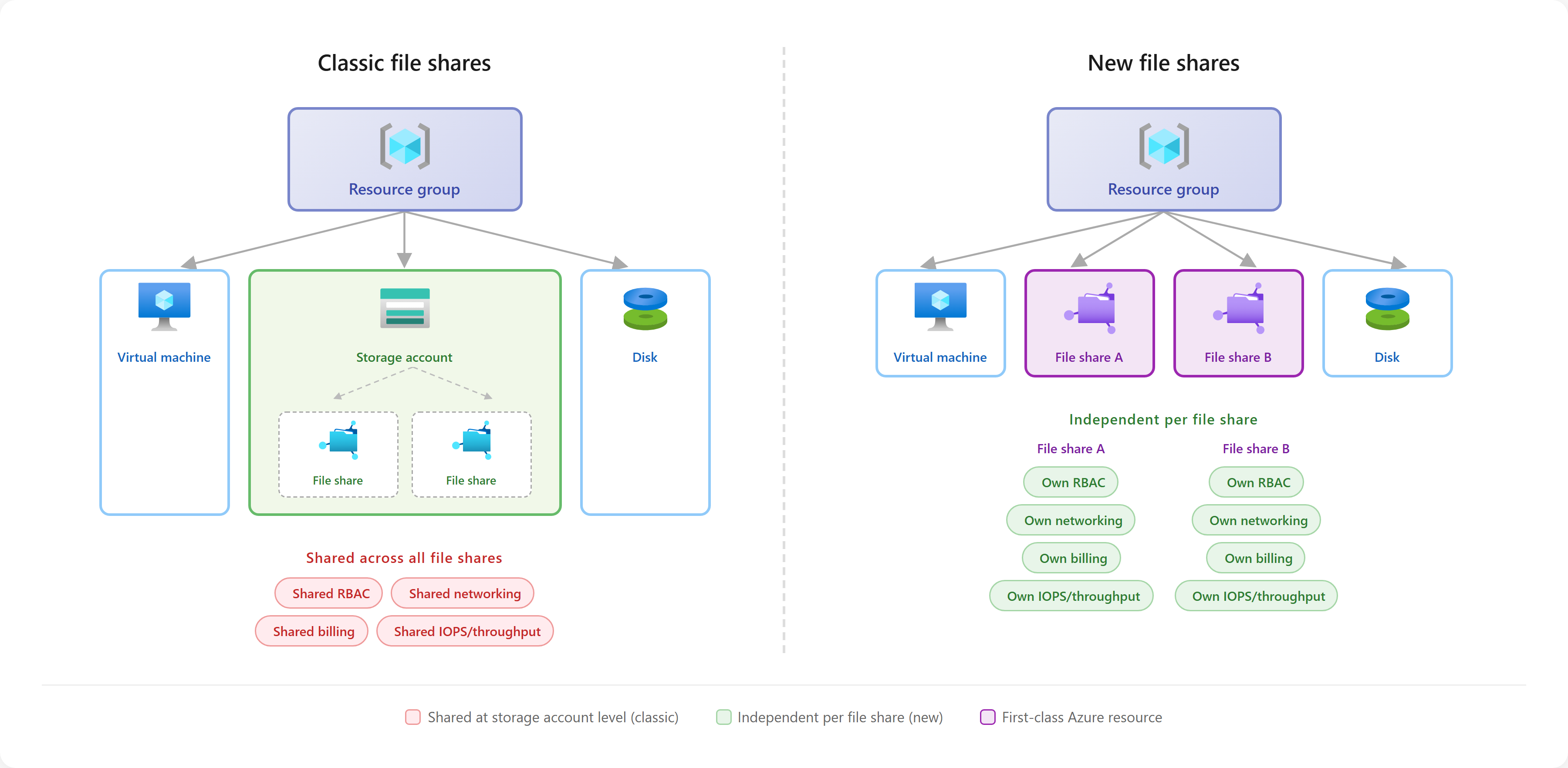
Microsoft.Storageresource provider. Storage accounts are top-level resources that represent a shared pool of storage, IOPS, and throughput in which you can deploy classic file shares or other storage resources, depending on the storage account kind. All storage resources that you deploy into a storage account share the limits that apply to that storage account. Classic file shares support both the SMB and NFS file sharing protocols.File shares, offered by the
Microsoft.FileSharesresource provider. File shares are a new top-level resource that simplifies the deployment of Azure Files by eliminating the need for a storage account. Unlike classic file shares, which you must deploy into a storage account, you deploy file shares directly into the resource group like storage accounts themselves, or other Azure resources such as virtual machines, disks, or virtual networks. Currently,Microsoft.FileSharesonly supports the NFS file sharing protocol. If you require SMB, choose classic file shares.
This video provides a comprehensive overview of the differences between the storage account and file share management models:
Classic file shares (Microsoft.Storage)
Classic file shares are file shares deployed in storage accounts. They support SMB and NFS, SSD and HDD media tiers, and multiple redundancy options. Supported combinations and regional availability depend on the protocol, media tier, and billing model. For example, NFS requires SSD storage. The storage account model has the following considerations:
Capacity planning: Classic file shares share the limits of their storage account. Provisioned storage accounts contain only file shares. Pay-as-you-go storage accounts can also contain blob containers, queues, and tables. Consider the combined storage, IOPS, and throughput needs of the resources in each account.
Shared settings: You apply many important settings, such as network and security rules, at the storage account level. As a result, you must carefully consider how you place classic file shares in the same storage account. Consider the storage account to be a trust boundary and only place classic file shares in the same storage account if you're okay with them having the same security settings.
Scaling complexity: Large scale Azure Files deployments can require managing many Azure subscriptions due to the constraints on storage accounts from the
Microsoft.Storageresource provider. See storage account limits for more information.
Classic file share deployments use two kinds of storage accounts:
Provisioned storage accounts: The
FileStoragestorage account kind identifies provisioned storage accounts. You can deploy provisioned classic file shares on either SSD or HDD based hardware by using provisioned storage accounts. You can only use provisioned storage accounts to store classic file shares. You can't use them for other storage resources such as blob containers, queues, and tables. Use provisioned storage accounts for all new classic file share deployments.Pay-as-you-go storage accounts: The
StorageV2storage account kind identifies pay-as-you-go storage accounts. You can deploy pay-as-you-go file shares on HDD based hardware by using pay-as-you-go storage accounts. You can use pay-as-you-go storage accounts to store classic file shares and other storage resources such as blob containers, queues, or tables.
To learn more, see Create a classic file share.
File shares (Microsoft.FileShares)
The Microsoft.FileShares resource provider offers file shares as a new top-level Azure resource. These file shares provide the following advantages over classic file shares:
Simplified management: Create file shares directly as top-level resources in the Azure portal or through management APIs. This approach removes the requirement to manage a storage account and streamlines the deployment experience.
Independent capacity and performance: Each file share has its own provisioned storage, IOPS, and throughput. You can scale these quantities within the file share's limits without managing a shared storage account limit.
Granular configuration: Apply networking and security settings at the file share level, so you have precise control of access boundaries and isolation. This configuration makes it easier to enforce security policies for specific apps, teams, or environments.
Predictable, flexible billing: File shares use the provisioned v2 billing model, which enables you to independently provision storage, IOPS, and throughput per share. Because Azure bills per top-level Azure resource, you can easily track the costs of each individual share for cost attribution back to the project, team, or customer that is using the file share.
Resource limits: File shares have per-share and subscription limits that differ from storage account limits. For the limits of both resource providers, see Azure Files scalability and performance targets.
Regional availability
You can create a file share with Microsoft.FileShares in all regions in the All tab of the Azure regions list, except the following regions:
- Australia Central 2
- India South Central
- Mexico Central
- Qatar Central
- Southeast Asia 3
- Spain Central
- Switzerland North
- Switzerland West
- Taiwan North
- West India
You can also use the Microsoft.FileShares resource provider to create a file share in JIO India Central and JIO India West.
Private endpoint support for file shares with Microsoft.FileShares is available in all Azure public cloud regions.
Comparing resource providers: Microsoft.Storage versus Microsoft.FileShares
Evaluate the new file share experience with Microsoft.FileShares for all your new Azure Files NFS protocol deployments.
Use the following table to compare feature support for your workload. Classic file shares support SMB and NFS. Microsoft.FileShares currently supports NFS.
| Feature | Classic file shares  |
File shares (Microsoft.FileShares)  |
|---|---|---|
| Support guarantee | Generally available | Generally available |
| Top level resource for the service | Storage account  |
File shares |
| SMB protocol |  |
 |
| NFS protocol | |
|
| Azure File Sync support | |
|
| Require storage account | |
|
| Pay-as-you-go billing model | |
|
| Provisioned v1 billing model | |
|
| Provisioned v2 billing model | |
|
| HDD supportability | |
|
| SSD supportability | |
|
| LRS | |
|
| ZRS | |
|
| GRS | |
|
| GZRS | |
|
| Independent top-level resource for each file share | |
|
| Network rules configured on each file share | |
|
| Network rules shared by file shares in a storage account | |
Not applicable |
| Service endpoint policies | |
|
| Standard service endpoints | |
|
| Network security perimeter | |
|
| AKS CSI driver | |
|
| Data plane REST APIs | |
|
| Soft delete support | |
|
| Snapshots support | |
|
| Encryption in transit | |
|
| Customer managed keys | |
|
| Zonal pinning | |
|