Note
Access to this page requires authorization. You can try signing in or changing directories.
Access to this page requires authorization. You can try changing directories.
Microsoft Copilot Studio supports both the standard harness and the GitHub Copilot harness. This article explains when you might switch harnesses, what changes when you do, and how to move between harnesses based on your authoring goals.
Note
This article covers switching between the standard harness and the GitHub Copilot harness. The Copilot chat and Customer Conversation harnesses use separate creation paths and aren't part of this switch. For a comparison of all four harnesses, see Harnesses in Copilot Studio.
Note
This article describes features used in agents or agent flows powered by the standard harness.
Build and access standard harness agents and agent flows
There are multiple ways to access and build agents and agent flows that use the standard harness:
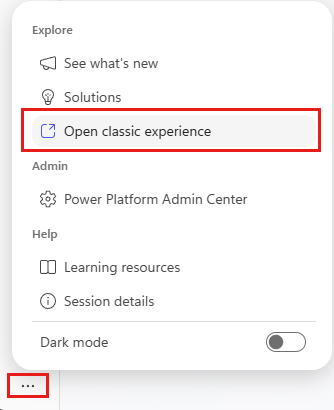
On the home page, select the three dots (…) at the bottom of the side bar, and then select Open classic experience.
To create new agents and agent flows powered by the standard harness, select Other ways to build on the home page.
Go to Agents or Workflows, then open the agent or flow from the list.