重写请求。
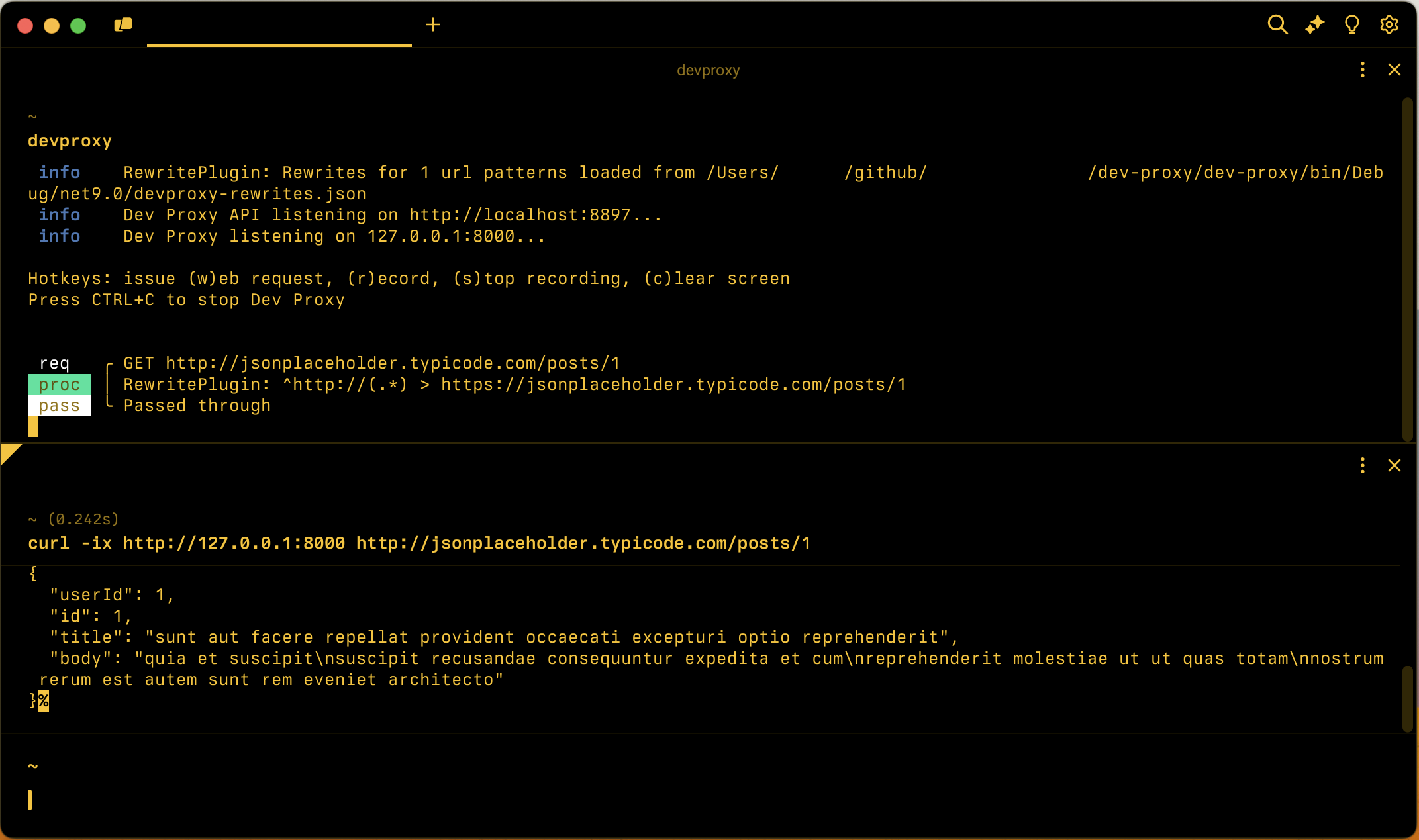
配置示例
{
  "$schema": "https://raw.githubusercontent.com/dotnet/dev-proxy/main/schemas/v4.0.0/rc.schema.json",
  "plugins": [
    {
      "name": "RewritePlugin",
      "enabled": true,
      "pluginPath": "~appFolder/plugins/DevProxy.Plugins.dll",
      "configSection": "rewritePlugin"
    }
  ],
  "rewritePlugin": {
    "$schema": "https://raw.githubusercontent.com/dotnet/dev-proxy/main/schemas/v4.0.0/rewriteplugin.schema.json",
    "rewritesFile": "rewrites.json"
  }
}
配置属性
| properties | 说明 | 默认 |
|---|---|---|
rewritesFile |
包含重写定义的文件的路径 | rewrites.json |
命令行选项
无
重写文件示例
下面是重写规则的示例。
重写从 HTTP 到 HTTPS 的所有请求
重写从 HTTP 到 HTTPS 的所有请求。 在此上下文中, 所有 请求都意味着使用开发代理或 RewritePlugin 配置的所有请求。
{
  "$schema": "https://raw.githubusercontent.com/dotnet/dev-proxy/main/schemas/v4.0.0/rewriteplugin.rewritesfile.schema.json",
  "rewrites": [
    {
      "in": {
        "url": "^http://(.*)"
      },
      "out": {
        "url": "https://$1"
      }
    }
  ]
}
设置请求标头
将所有 Accept-Language 请求的标头设置为 https://api.contoso.com. 如果请求已有标头,插件将替换其值。 如果缺少标头,插件会添加它。 由于规则未指定 out URL,插件不会更改请求 URL。
{
  "$schema": "https://raw.githubusercontent.com/dotnet/dev-proxy/main/schemas/v4.0.0/rewriteplugin.rewritesfile.schema.json",
  "rewrites": [
    {
      "in": {
        "url": "^https://api\\.contoso\\.com/"
      },
      "out": {
        "headers": [
          {
            "name": "Accept-Language",
            "value": "nl-NL"
          }
        ]
      }
    }
  ]
}
从环境变量重写对 URL 的请求
重写对 https://api.contoso.com 存储在环境变量中的 API_BASE_URL 基 URL 的请求,保留路径的其余部分。
{
  "$schema": "https://raw.githubusercontent.com/dotnet/dev-proxy/main/schemas/v4.0.0/rewriteplugin.rewritesfile.schema.json",
  "rewrites": [
    {
      "in": {
        "url": "^https://api\\.contoso\\.com/(.*)"
      },
      "out": {
        "url": "${env:API_BASE_URL}/$1"
      }
    }
  ]
}
模拟文件属性
| properties | 说明 | 必须 |
|---|---|---|
rewrites |
重写对象的数组,这些对象定义重写规则列表,重写Plugin 应用于它截获的请求 | 是 |
重写对象
每个重写规则具有以下属性:
| properties | 说明 | 必须 |
|---|---|---|
in |
重写模式 以匹配传入请求。 | 是 |
out |
重写模式 以重写请求 | 是 |
注解
如果重写Plugin 截获的请求与模式中定义的所有属性不匹配,插件不会将重写规则应用于请求。
重写模式
每个重写模式具有以下属性:
| properties | 说明 | 必须 | 默认值 | 示例值 |
|---|---|---|---|---|
url |
在模式 中 ,插件应用于 URL 的正则表达式。 在 out 模式中,要重写请求的 URL。 如果在 out 模式中省略它,插件不会更改请求 URL。 | 是 in,no in | ^http://(.*) |
|
headers |
要针对 请求设置的请求标头 数组。 仅在 out 模式中受支持。 | no |
注解
out 模式必须指定或headers同时指定url两者。
如果在模式中的正则表达式中使用捕获组,则可以在 out 模式中引用它们。 例如,如果要重写 http://example.com/foo 为 https://example.com/foo,可以使用以下重写规则:
{
  "$schema": "https://raw.githubusercontent.com/dotnet/dev-proxy/main/schemas/v4.0.0/rewriteplugin.rewritesfile.schema.json",
  "rewrites": [
    {
      "in": {
        "url": "^http://(.*)"
      },
      "out": {
        "url": "https://$1"
      }
    }
  ]
}
在 out URL 中,可以使用语法引用环境变量 ${env:VAR_NAME} 。 开发代理将插入环境变量的值 as-is,因此该值还可以引用 模式中的 捕获组。 开发代理仅针对 与模式匹配 的请求解析环境变量,并且不会 在模式中 扩展环境变量。 如果未设置引用的环境变量,则开发代理会记录错误并跳过重写规则。
请求标头
每个请求标头具有以下属性:
| properties | 说明 | 必须 |
|---|---|---|
name |
请求标头的名称 | 是 |
value |
要为请求标头设置的值 | 是 |
注解
该插件与标头名称不区分大小写匹配。 如果请求已有标头,插件将替换其值。 如果缺少标头,插件会添加它。
插件仅在 URL 模式 与 URL 模式 匹配的请求上设置标头。 插件在应用同一规则的 URL 重写之前评估匹配项,因此当规则同时重写 URL 和标头时,标头将应用于与 URL 重写相同的请求。
可以使用语法在标头值 ${env:VAR_NAME} 中引用环境变量。 开发代理以与 在外 URL 中相同的方式解析它们,如果未设置引用的环境变量,则跳过重写规则。 标头值不支持从 模式捕获 组。
