重要
MCP 和 API 插件在 声明性代理中提供操作。 它们不是独立的可安装插件包:只有包含的代理才能访问它们的功能和工具。 有关包和操作清单关系的信息,请参阅 插件和声明性代理操作。
API 插件可以使用自适应卡片响应模板来增强 智能 Microsoft 365 Copilot 副驾驶® 根据从 API 接收到的响应生成的响应。 自适应卡在生成的响应中呈现引文。
API 插件可以通过两种方式定义自适应卡片响应模板:作为 插件清单中定义的静态模板,或作为 API 响应的一部分返回的动态模板。 插件开发人员通过将 自适应卡架构 与 自适应卡模板语言结合使用来定义模板。
静态响应模板
如果你的 API 始终返回相同类型的项目,并且不需要经常更改自适应卡片的格式,则静态响应模板是一个不错的选择。 在插件清单中的对象属性response_semantics中static_template定义静态模板,如以下示例所示。
"functions": [
  {
    "name": "GetBudgets",
    "description": "Returns details including name and available funds of budgets, optionally filtered by budget name",
    "capabilities": {
      "response_semantics": {
        "data_path": "$",
        "properties": {
          "title": "$.name",
          "subtitle": "$.availableFunds"
        },
        "static_template": {
          "type": "AdaptiveCard",
          "$schema": "http://adaptivecards.io/schemas/adaptive-card.json",
          "version": "1.5",
          "body": [
            {
              "type": "Container",
              "$data": "${$root}",
              "items": [
                {
                  "type": "TextBlock",
                  "text": "Name: ${if(name, name, 'N/A')}",
                  "wrap": true
                },
                {
                  "type": "TextBlock",
                  "text": "Available funds: ${if(availableFunds, formatNumber(availableFunds, 2), 'N/A')}",
                  "wrap": true
                }
              ]
            }
          ]
        }
      }
    }
  },
]
- 将属性
. This value is a [JSONPath query](https://www.rfc-editor.org/rfc/rfc9535) that indicates that the root of the JSON response contains the relevant data. The设置为response_semantics.data_pathstatic_template.body[“$data”]property value is${$root}, which is Adaptive Card template language syntax to override any prior data scoping and break back to the root. Setting this value isn't strictly needed, since thedata_path' 已设置为根。 -
text第一个TextBlock的属性使用自适应卡模板语法${if(name, name, 'N/A')}。 这引用nameAPI 响应中的属性。 该if函数指定如果有值,则name使用该值,否则使用N/A. -
text第二个TextBlock属性使用自适应卡模板语法${if(availableFunds, formatNumber(availableFunds, 2), 'N/A')}。 这引用availableFundsAPI 响应中的属性。 此formatNumber函数将数字呈现为带两位小数的字符串。
请考虑此静态模板和以下 API 响应。
[
    {
        "name": "Fourth Coffee lobby renovation",
        "availableFunds": 12000
    }
]
此组合生成以下自适应卡。

动态响应模板
如果 API 返回多个类型,动态响应模板是一个不错的选择。 使用动态模板,可以为返回的每个项目分配响应模板。 一个或多个动态模板作为 API 响应的一部分返回,响应中的数据项指示要使用的模板。
若要使用动态模板,请指示数据项上的哪个属性指定 API 插件清单中属性 response_semantics.properties.template_selector 中的模板,如本例所示。
{
  "name": "GetTransactions",
  "description": "Returns details of transactions identified from filters like budget name or category. Multiple filters can be used in combination to refine the list of transactions returned",
  "capabilities": {
    "response_semantics": {
      "data_path": "$.transactions",
      "properties": {
        "template_selector": "$.displayTemplate"
      }
    }
  }
}
在此示例中, data_path 该属性设置为 $.transactions,指示在 API 响应根目录的属性中找到 transactions 卡片的数据。 属性 template_selector 设置为 $.displayTemplate,指示数组中 transactions 指定要使用的模板的每个项目上的属性是该 displayTemplate 属性。
属性 template_selector 指示的属性包含 JSONPath 查询,用于在响应中查找项目的模板。
请考虑此模板和以下 API 响应。
{
  "transactions": [
    {
      "budgetName": "Fourth Coffee lobby renovation",
      "amount": -2000,
      "description": "Property survey for permit application",
      "expenseCategory": "permits",
      "displayTemplate": "$.templates.debit"
    },
    {
      "budgetName": "Fourth Coffee lobby renovation",
      "amount": -7200,
      "description": "Lumber and drywall for lobby",
      "expenseCategory": "materials",
      "displayTemplate": "$.templates.debit"
    },
    {
      "budgetName": "Fourth Coffee lobby renovation",
      "amount": 5000,
      "description": "Additional funds to cover cost overruns",
      "expenseCategory": null,
      "displayTemplate": "$.templates.credit"
    }
  ],
  "templates": {
    "debit": {
      "type": "AdaptiveCard",
      "version": "1.5",
      "body": [
        {
          "type": "TextBlock",
          "size": "medium",
          "weight": "bolder",
          "color": "attention",
          "text": "Debit"
        },
        {
          "type": "FactSet",
          "facts": [
            {
              "title": "Budget",
              "value": "${budgetName}"
            },
            {
              "title": "Amount",
              "value": "${formatNumber(amount, 2)}"
            },
            {
              "title": "Category",
              "value": "${if(expenseCategory, expenseCategory, 'N/A')}"
            },
            {
              "title": "Description",
              "value": "${if(description, description, 'N/A')}"
            }
          ]
        }
      ],
      "$schema": "http://adaptivecards.io/schemas/adaptive-card.json"
    },
    "credit": {
      "type": "AdaptiveCard",
      "version": "1.5",
      "body": [
        {
          "type": "TextBlock",
          "size": "medium",
          "weight": "bolder",
          "color": "good",
          "text": "Credit"
        },
        {
          "type": "FactSet",
          "facts": [
            {
              "title": "Budget",
              "value": "${budgetName}"
            },
            {
              "title": "Amount",
              "value": "${formatNumber(amount, 2)}"
            },
            {
              "title": "Description",
              "value": "${if(description, description, 'N/A')}"
            }
          ]
        }
      ],
      "$schema": "http://adaptivecards.io/schemas/adaptive-card.json"
    }
  }
}
-
transactions响应中的属性包含一个项目数组。 - 该
templates属性是一个对象,该对象中的每个属性都包含自适应卡模板。 - 数组中每个
displayTemplate对象的 on 设置为 或$.templates.credit。transactions$.templates.debit
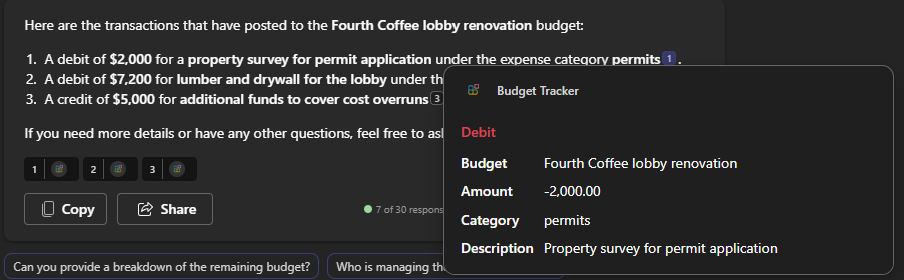
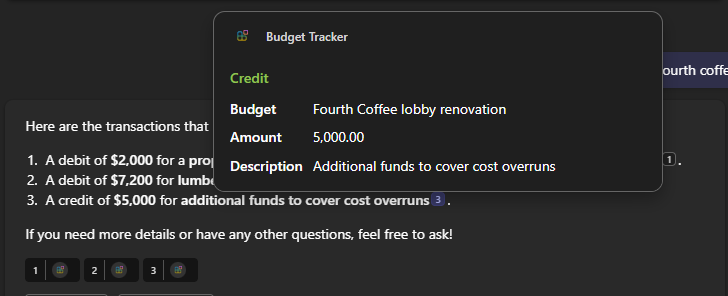
此插件清单和 API 响应的组合产生以下自适应卡。
当 API 响应中的数组为空时,防止出现空白自适应卡
当 API 响应中的数组属性为空且模板不包含用于处理该场景的条件逻辑时,自适应卡可能会呈现空白。
以下示例显示数组不包含项目的 recommendations API 响应:
{"answer":"","recommendations":[],"followUpMessage":""}
在本例中:
- 建议数组中没有项。
- 自适应卡模板尝试循环访问数组,而不检查数据是否可用。
要防止空白卡渲染,请将模板绑定到正确的数组属性,并添加条件逻辑来控制渲染。
使用 data_path以下命令绑定到数组:
"data_path": "$.recommendations"
仅当数据存在时才迭代对象:
{ "type": "ColumnSet", "$data": "${$root}", "$when": "${title != null && title != ''}" }
(可选)在数组为空时提供回退文本:
{ "type": "TextBlock", "text": "No recommendations available", "$when": "${length($root) == 0}" }
提示
始终验证 data_path 并包含 $when 空数组的条件,以防止出现空白自适应卡。
同时使用静态和动态模板
插件可以结合使用静态和动态模板。 在此方案中,静态模板充当默认模板,如果项不存在属性 template_selector ,或者其值未解析为 API 响应中的模板,则使用该模板。
将域添加到应用清单
将自适应卡使用的任何域添加到应用清单的 validDomains 部分。
- 使用
Action.OpenUrl时,请确保在属性中validDomains包含目标 URL 的域。 如果域未列出,Teams 会显示消息“ URL 可能会导致不受信任的内容”。 - API 插件或声明式代理在自适应卡响应中返回的图像 URL 必须在属性中
validDomains列出其域。 如果域未列出,则 智能 Microsoft 365 Copilot 副驾驶® 不会呈现图像。
确保跨 智能 Microsoft 365 Copilot 副驾驶® 中心响应式自适应卡片
自适应卡必须设计为能够跨各种图面大小响应。 无论使用何种设备或平台,这种设计都能确保无缝的用户体验。 为了实现此目标,请在不同的 智能 Microsoft 365 Copilot 副驾驶® 中心(包括 Teams、Word 和 PowerPoint)上验证自适应卡。 此外,通过收缩和展开 Copilot UI 来验证各种视区宽度。 此过程可确保自适应卡以最佳方式运行,并在所有平台上提供一致的体验。 应用以下最佳做法:
- 尽可能避免使用多列布局。 即使在最窄的视区宽度下,单列布局也往往呈现良好。
- 不要将文本和图像元素放在同一行中,除非图像是小图标或虚拟形象。
- 避免为自适应卡中的元素分配固定宽度;相反,允许它们根据视区宽度调整大小。 但是,您可以为图标和头像等小图像分配固定宽度。