为 .NET 项目创建早期绑定类:
- 提高代码可读性和可维护性。
- 降低错误的风险,因为它们提供编译时类型检查。
- 提高开发人员工作效率,因为开发人员可以使用 IntelliSense 发现表、列和选择选项。
- 提供 OrganizationServiceContext 类,以便可以使用 LINQ 和其他功能处理数据来编写 Dataverse 查询。
了解详细信息:
使用 Power Platform CLI pac modelbuilder build 命令生成早期绑定代码类。 也可以使用 CrmSvcUtil.exe 代码生成工具,但对于 Dataverse,我们建议使用 pac modelbuilder build 此命令。
了解如何使用 CrmSvcUtil.exe 工具为 SDK for .NET 生成早期绑定类
与许多 Power Platform CLI 命令一样, pac modelbuilder build 有许多参数可用于控制结果。 在本文中,建议首先对大多数用例使用 --settingsTemplateFile 参数。 使用此参数可引用 JSON 文件,可在其中控制所有其他可用设置。 这样,就无需编写一长串参数,并且可以更新适合项目的配置,以便在需要这些参数时允许重新生成类。
如果愿意,仍可以将生成命令与参数一起使用。 请参阅 “使用参数”。
开始
开始之前:
从以下步骤开始:
在你的 .NET 项目中,添加对以下任一 NuGet 包的引用:
- 对于客户端应用程序:Microsoft。PowerPlatform.Dataverse.Client
- 对于 Dataverse 插件项目:Microsoft.CrmSdk.CoreAssemblies
创建名为
model的文件夹。在
model文件夹中,添加builderSettings.json具有以下设置的文件:{ "emitentityetc-comment": "Generate a constants structure that contains all of the field names by entity at the time of code generation.", "emitEntityETC": false, "emitfieldsclasses-comment": "Generate a constants structure that contains all of the field names by entity at the time of code generation.", "emitFieldsClasses": false, "emitvirtualattributes-comment": "When set, includes the Virtual Attributes of entities in the generated code.", "emitVirtualAttributes": false, "entitynamesfilter-comment": "Filters the list of entities are retrieved when reading data from Dataverse.", "entityNamesFilter": [ "account", "contact" ], "entitytypesfolder-comment": "Folder name that contains entities.", "entityTypesFolder": "Entities", "generateGlobalOptionSets-comment": "Emit all Global OptionSets. Note: If an entity contains a reference to a global optionset, it is emitted even if this switch is not present.", "generateGlobalOptionSets": false, "generatesdkmessages-comment": "When set, emits Sdk message classes as part of code generation", "generateSdkMessages": true, "language-comment": "The language to use for the generated proxy code. This value can be either 'CS' or 'VB'. The default language is 'CS'.", "language": "CS", "logLevel-comment": "Log level. The default value is 'Off'.", "logLevel": "Off", "messagenamesfilter-comment": "Filters the list of messages that are retrieved when reading data from Dataverse.", "messageNamesFilter": [ "searchautocomplete", "searchquery", "sample_*" ], "messagestypesfolder-comment": "Folder name that contains messages.", "messagesTypesFolder": "Messages", "namespace-comment": "The namespace for the generated code.", "namespace": "ExampleProject", "optionsetstypesfolder-comment": "Folder name that contains option sets.", "optionSetsTypesFolder": "OptionSets", "serviceContextName-comment": "The name for the generated service context. If a value is passed in, it's used for the Service Context. If not, no Service Context is generated.", "serviceContextName": "OrgContext", "suppressGeneratedCodeAttribute-comment": "When set, this suppress all generated objects being tagged with the code generation engine and version", "suppressGeneratedCodeAttribute": true, "suppressINotifyPattern-comment": "When enabled, doesn't write the INotify wrappers for properties and classes.", "suppressINotifyPattern": true }Note
此文件是可以使用参数生成的
pac modelbuilder build--writesettingsTemplateFile文件的修改版本。 了解如何在 Using 参数中生成没有注释的文件。使用以下命令,使用 中
builderSettings.json定义的设置为连接的环境生成早期绑定类。 该C:\projects\exampleproject\路径表示项目的路径,并且model是你创建的文件夹。PS C:\projects\exampleproject\model> pac modelbuilder build -o . -stf .\builderSettings.json此命令使用以下参数:
-
-o是值为 的必需--outdirectory的快捷方式,用于表示当前目录。 -
-stf参数--settingsTemplateFile的快捷方式,其值为.\builderSettings.json,用于指示builderSettings.json当前目录。
还可以从
exampleproject目录中使用此命令:PS C:\projects\exampleproject>pac modelbuilder build -o model -stf model\builderSettings.json-
了解会写入哪些文件
使用任一命令,你会收到以下输出:
Connected to... Your Organization
Connected as you@yourorganization.onmicrosoft.com
Begin reading metadata from MetadataProviderService
      Begin Reading Metadata from Server
      Read 2 Entities - 00:00:00.732
      Read 0 Global OptionSets - 00:00:00.000
      Read 12 SDK Messages - 00:00:00.889
      Completed Reading Metadata from Server - 00:00:01.694
Completed reading metadata from MetadataProviderService - 00:00:01.697
Begin Writing Code Files
      Processing 2 Entities
      Wrote 2 Entities - 00:00:00.0625873
      Processing 12 Messages
      Wrote 3 Message(s). Skipped 9 Message(s) - 00:00:00.0091589
      Processing 0 Global OptionSets
      Wrote 0 Global OptionSets - 00:00:00.0000045
      Code written to C:\projects\exampleproject\model\Entities\account.cs.
      Code written to C:\projects\exampleproject\model\Entities\contact.cs.
      Code written to C:\projects\exampleproject\model\Messages\searchquery.cs.
      Code written to C:\projects\exampleproject\model\Messages\searchautocomplete.cs.
      Code written to C:\projects\exampleproject\model\OrgContext.cs.
      Code written to C:\projects\exampleproject\model\EntityOptionSetEnum.cs.
Completed Writing Code Files - 00:00:00.116
Generation Complete - 00:00:01.815
PS C:\projects\exampleproject\model>
检查输出时,你会看到它只为 中指定的表生成类,并且只生成 中指定的消息。 指定项目中使用的哪些表(实体)和消息。 否则,该命令会为所有表和消息生成类。
对于 messageNamesFilter,请在这些值中使用 * 作为通配符字符。 当解决方案中的消息共享通用自定义前缀时,此筛选器非常有用。
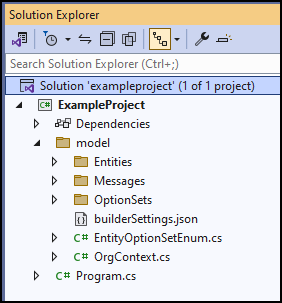
pac modelbuilder build 将文件写入文件夹,其中包含在设置文件中控制的名称:
- 实体类转到设置指定的
entityTypesFolder文件夹。 - 邮件类转到设置指定的
messagesTypesFolder文件夹。 -
OrganizationServiceContext 类转到具有设置指定
serviceContextName名称的文件。 - 所有类都是在设置中设置的
namespace命名空间的一部分。
Note
如果您要生成消息类,请始终为 serviceContextName 设置指定名称。 请参阅生成消息类时包含 serviceContextName。
这是文件和文件夹在Visual Studio中的显示方式:
将这些文件写入项目后,即可使用早期绑定类。
如果要更改它们,请删除 builderSettings.json 文件夹中除 model 之外的文件,更改 builderSettings.json 中的设置,然后再次生成它们。
使用参数
您无需将 builderSettings.json 设置文件或 --settingsTemplateFile 参数与 pac modelbuilder build 一起使用。 可以直接使用参数调用命令。 有关参考文档和示例,请参阅 pac modelbuilder 生成参考文档。
如果使用 builderSettings.json 设置文件和 --settingsTemplateFile 参数,则可以使用命令行参数替代这些设置。
下面是一个示例,演示如何通过指定参数,使用与 “入门”部分中的示例 相同的设置来生成文件:
PS C:\>pac modelbuilder build `
   --outdirectory C:\projects\exampleproject\model `
   --entitynamesfilter 'account;contact' `
   --generatesdkmessages `
   --messagenamesfilter 'searchautocomplete;searchquery;sample_*' `
   --namespace ExampleProject `
   --serviceContextName OrgContext `
   --suppressGeneratedCodeAttribute `
   --suppressINotifyPattern `
   --writesettingsTemplateFile
此示例不包含所有设置,因为它使用默认选项。 如果使用 --writesettingsTemplateFile 参数 生成 builderSettings.json 文件,则本文“ 入门”部分 的示例中不包含注释。 使用参数的示例会在 model 文件夹中写入以下 builderSettings.json 文件:
{
  "suppressINotifyPattern": true,
  "suppressGeneratedCodeAttribute": true,
  "language": "CS",
  "namespace": "ExampleProject",
  "serviceContextName": "OrgContext",
  "generateSdkMessages": true,
  "generateGlobalOptionSets": false,
  "emitFieldsClasses": false,
  "entityTypesFolder": "Entities",
  "messagesTypesFolder": "Messages",
  "optionSetsTypesFolder": "OptionSets",
  "entityNamesFilter": [
    "account",
    "contact"
  ],
  "messageNamesFilter": [
    "searchautocomplete",
    "searchquery",
    "sample_*"
  ],
  "emitEntityETC": false,
  "emitVirtualAttributes": false
}
在生成消息类时包含 serviceContextName
如果要生成消息类,请始终包含参数的名称 serviceContextName ,以便使用代码生成 OrganizationServiceContext 类。
此类包含一个重要属性,可用于使用生成的消息类。 如果未包含一个 OrganizationServiceContext,则尝试使用生成的消息类时,会收到以下错误。
The formatter threw an exception while trying to deserialize the message:
There was an error while trying to deserialize parameter http://schemas.microsoft.com/xrm/2011/Contracts/Services:request.
The InnerException message was 'Error in line 1 position 700. Element 'http://schemas.microsoft.com/xrm/2011/Contracts/Services:request' contains data from a type that maps to the name 'http://schemas.microsoft.com/xrm/2011/new/:<your generated class name>'.
The deserializer has no knowledge of any type that maps to this name.
Consider changing the implementation of the ResolveName method on your DataContractResolver to return a non-null value for name '<your generated class name>' and namespace 'http://schemas.microsoft.com/xrm/2011/new/'.'.
Please see InnerException for more details.
社区工具
早期绑定生成器 V2 是由社区创建的 XrmToolBox 插件,用于提供生成正确builderSettings.json文件的用户界面,并为用户调用pac modelbuilder build命令。 由于 UI 仅生成 builderSettings.json 文件并调用 pac modelbuilder build 命令,因此你仍然可以在管道中运行该命令,而无需依赖 XrmToolBox。 该插件还提供了 pac modelbuilder 所不具备的配置选项。 例如,它支持对类名和属性名的大小写进行显式控制,以及进行特定语言的字符音译。 早期绑定生成器 V2 可以通过利用 pac modelbuilder 的可扩展性功能来实现这一点。
Note
Microsoft不会将支持扩展到社区开发的工具。 如果对该工具有疑问,请联系发布者。 有关详细信息,请参阅 XrmToolBox。
对于本地部署的 Dynamics 365 Customer Engagement
Power Platform CLI 不适用于本地Dynamics 365 Customer Engagement。 需要使用 CrmSvcUtil.exe 代码生成工具生成早期绑定类。
了解如何使用 CrmSvcUtil.exe 工具为 .NET SDK 生成早期绑定类
相关文章
后期绑定和早期绑定编程
示例:早期绑定表操作
开发者工具和资源
Dataverse 开发工具
了解如何使用 CrmSvcUtil.exe 工具为 .NET SDK 生成早期绑定类