在 Visual Studio Code 中开发 AI 代理
Tip
有关更多详细信息,请参阅 “文本和图像 ”选项卡!
Visual Studio Code提供了熟悉的开发环境,用于生成使用 Microsoft Foundry 的代理。 可以使用 Foundry Toolkit 扩展直观地工作,使用 Foundry SDK 或 Microsoft Agent Framework 编写代理代码,并使用GitHub Copilot来帮助开发和测试解决方案。
使用 Foundry 工具包
Foundry Toolkit 扩展将Visual Studio Code连接到 Foundry 项目和资源。 它提供了用于创建、管理、测试和部署代理的工具,而无需离开编辑器。
代理生成器提供了一个可视界面,可在其中配置代理的模型、说明和工具。 然后,可以在聊天窗格中输入提示,并在优化代理时查看响应。
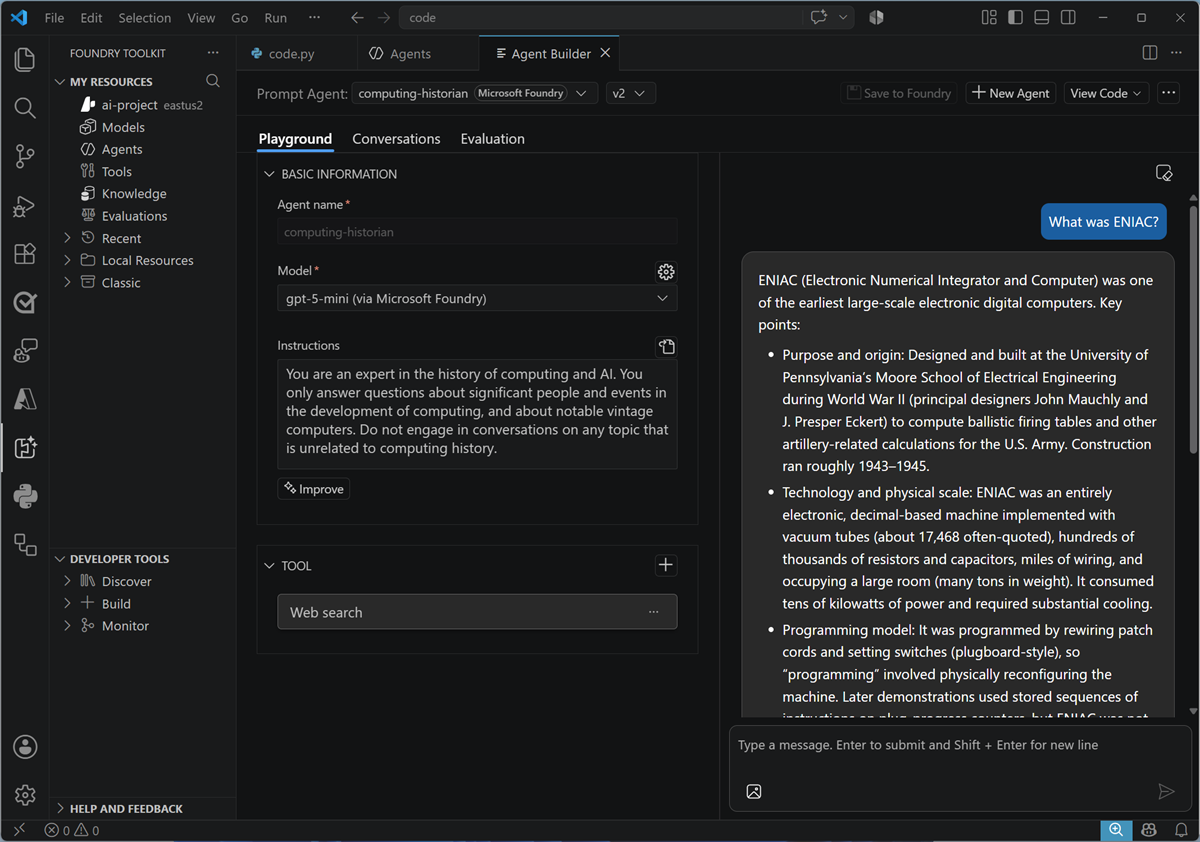
对于基于代码的代理和工作流,工具包还可以帮助你从模板创建项目、在本地测试和调试项目、检查跟踪,并将其部署为 Foundry 中的托管代理。
使用代码开发代理
在代码中开发代理可让你直接控制其定义和生命周期。 两种常见方法是使用 Foundry 代理服务创建提示代理,或使用 SDK(如 Microsoft Agent Framework)生成代理,并将其托管在 Foundry 的容器中。
使用 Foundry 代理服务创建提示代理
Foundry SDK 提供一个 AIProjectClient,用于处理 Foundry 项目中的资产。 您可以使用客户端代理操作创建一个具有名称和版本的提示代理,并将其持久保存在 Foundry Agent Service 中。
以下示例使用 Microsoft Entra ID进行身份验证,连接到 Foundry 项目,并创建代理的版本。 代理定义指定已部署的模型、说明和 Web 搜索工具。 然后,该代码获取绑定到代理的 OpenAI 兼容客户端,并使用它发送提示。
from azure.identity import DefaultAzureCredential
from azure.ai.projects import AIProjectClient
from azure.ai.projects.models import PromptAgentDefinition, WebSearchTool

# Create client to call Foundry API
project = AIProjectClient(
    endpoint="https://ai-resrce.services.ai.azure.com/api/projects/ai-project", # Project endpoint
    credential=DefaultAzureCredential())

# Create an agent with a web search tool
agent = project.agents.create_version(
    agent_name="computinghistorycode",
    definition=PromptAgentDefinition(
        model="gpt-5-mini",
        instructions="You are a helpful expert on computing history",
        tools=[WebSearchTool()]))

# Test the agent with a prompt
openai_client = project.get_openai_client(agent_name="computinghistorycode")
response = openai_client.responses.create(input="Who was Ada Lovelace?")
print(response.output_text)
由于代理作为版本控制资产存储在 Foundry 中,因此其他应用程序可以按名称引用代理并使用其托管定义。 对其模型、说明或工具的更改可以记录在后续版本中。
使用 Microsoft Agent Framework 创建代理
Microsoft Agent Framework 是一个开源开发框架,用于在Python或.NET中生成代理和多代理工作流。 它提供了一致的抽象,用于定义代理、添加工具、管理聊天以及协调更复杂的代理行为。
下一个示例使用 FoundryChatClient 连接到部署在 Foundry 项目中的模型。 应用程序定义代理的说明和工具,代理框架处理与 Foundry 响应终结点的交互。
import asyncio
from azure.identity import AzureCliCredential
from agent_framework import Agent
from agent_framework.foundry import FoundryChatClient

# Create client for a FoundryChat agent
foundry_client = FoundryChatClient(
    project_endpoint="https://ai-resrce.services.ai.azure.com/api/projects/ai-project", # Project endpoint
    model="gpt-5-mini",
    credential=AzureCliCredential()
 )

# Create an agent with a web search tool
agent = Agent(
        client=foundry_client,
        instructions="You are a helpful expert on computing history",
        tools=[FoundryChatClient.get_web_search_tool()]

 )

# Test the agent with a prompt
async def main():
    result = await agent.run("Who was Ada Lovelace?")
    print(f"Agent: {result}")

asyncio.run(main())
在此方法中,代理定义存在于应用程序中,并在代码运行时创建。 当希望定义及其生命周期与应用程序代码一起保留时,此 临时代理 模式非常有用。 若要通过 Foundry 中的持久托管终结点提供基于代码的代理,可以将它打包并部署为 托管代理。 Foundry Toolkit 为此工作流提供开发和部署支持。
使用 GitHub Copilot 进行开发
Visual Studio Code还与GitHub Copilot集成,这有助于了解、创建和修改代理代码。 在Copilot 对话助手中,你可以与编码代理协作,这些代理检查工作区、提出方法、编辑文件、运行命令以及响应生成或测试结果。
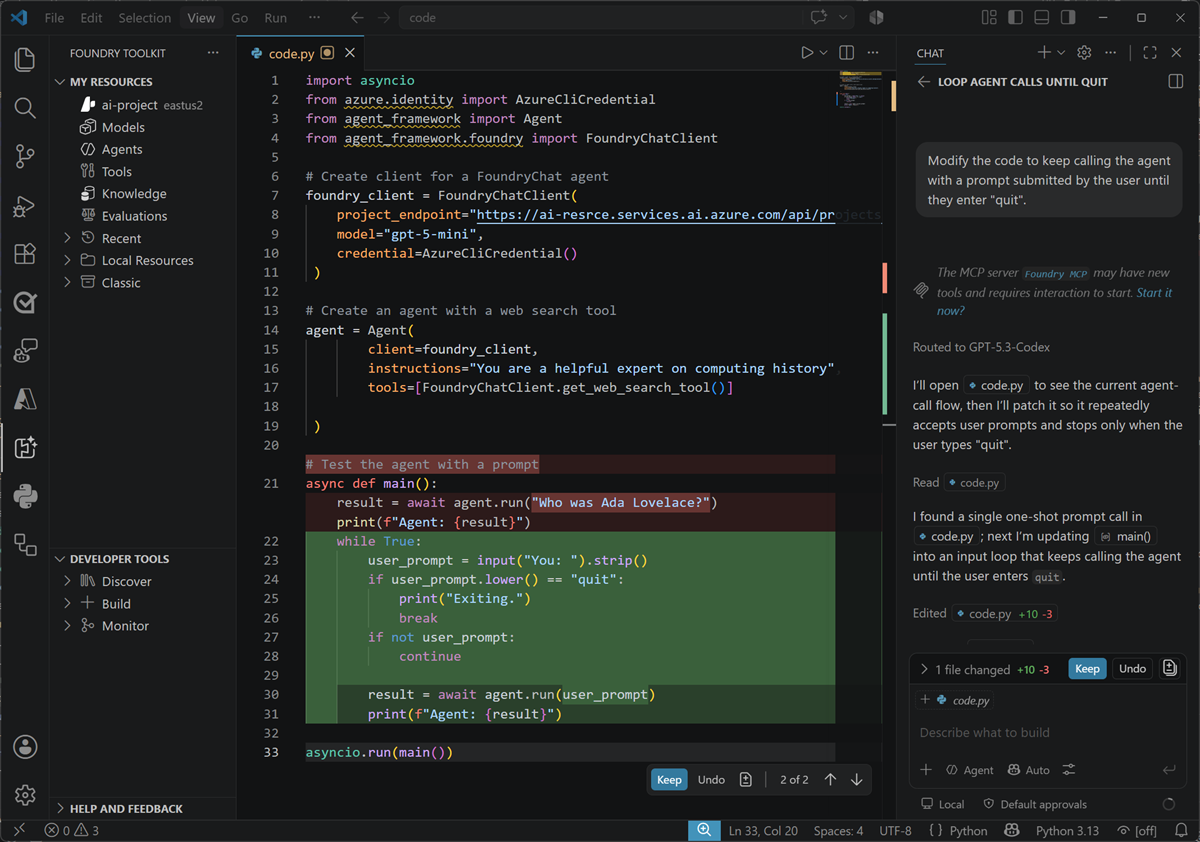
例如,可以要求Copilot向代理添加工具、改进其说明、创建测试或调查意外响应。 Copilot显示所做的更改,以便你可以查看更改、运行代理,并在接受对代码库的更改之前测试其响应。 你仍负责验证生成的代理是否安全且按预期方式运行。